You open Google Maps to check your listing and it's gone. Or a red banner in your Business Profile dashboard says the profile has been suspended. For a local business that gets most of its calls from Google, this can feel like the shop sign has been taken down overnight.
A suspension is serious, but it is often fixable. The businesses that recover fastest are the ones that slow down, find the actual cause, fix it, and only then appeal. The ones that struggle usually rush an appeal, edit the profile repeatedly, or open a brand-new listing. This guide explains why Google suspends Business Profiles, how the appeal process works, and the mistakes that turn a short suspension into a long one.
Suspended, disabled, or restricted: what's the difference?
Google uses a few different labels, and it helps to know which one you're dealing with before you do anything.
Suspended: Google has found what it believes is a guideline violation on the profile. Depending on the case, the listing may disappear from Maps and Search, or stay visible while you lose the ability to manage it.
Disabled: Usually more serious and often linked to the Google Account that manages the profile, not just the listing itself. You typically can't update the profile at all.
Restricted features: In some cases Google limits specific features, for example blocking new reviews after it detects fake engagement, without suspending the whole profile.
One important rule from Google's own help documentation: if the Google Account managing the profile is restricted, that account has to be reinstated first. Only then can you appeal decisions about the profile itself.
The most common reasons profiles get suspended
Google rarely spells out the exact problem, so you have to audit the profile yourself. In our experience reviewing business listings, most suspensions come back to one of these issues.
1. Keywords added to the business name
This is the single most common cause. If your sign says "Ali Dental Clinic" but your profile says "Ali Dental Clinic | Best Dentist in Lahore | Teeth Whitening," the extra words break Google's naming rules. Your profile name should match the name customers see on your signage, documents and website.
2. An address you don't actually operate from
Virtual offices, PO boxes, mailbox services and shared coworking desks that aren't staffed during business hours often trigger suspensions. Google wants an address where the business genuinely operates.
3. A service-area business showing its home address
Plumbers, electricians, cleaners and other businesses that travel to customers should usually hide their address and set a service area instead. Showing a home address as if it were a storefront that customers can visit is a frequent problem.
4. Duplicate or multiple listings
Creating a second profile for the same location, or separate profiles for each service you offer, looks like spam to Google's systems.
5. Many edits in a short time
Changing the name, category, address and phone number all in one afternoon can trigger an automated review. This also catches business owners who were simply tidying up their profile.
6. Fake or incentivised reviews
Buying reviews, offering discounts in exchange for five stars, or having staff post reviews can lead to restrictions or suspension. We cover this in detail in our guide on how to spot fake reviews on business listings.
7. A restricted category or business type
Some industries, such as locksmiths, garage door repair, certain financial and legal services, and businesses that operate only online, face stricter checks or aren't eligible for a profile at all.
8. Problems with who manages the profile
If an agency, former employee or unknown user has access to your profile and their account gets flagged, it can affect every profile they manage. Review your list of managers regularly and remove anyone who no longer needs access.
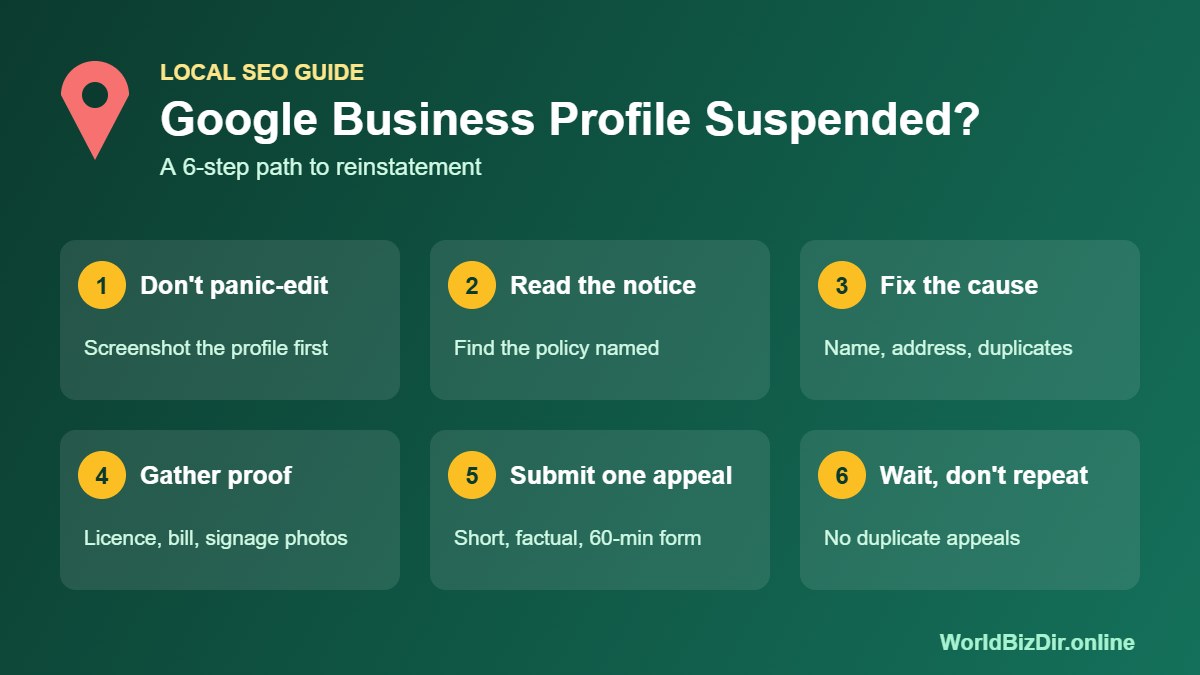
How to get your profile reinstated, step by step
Step 1: Don't panic-edit
Resist the urge to change everything at once. Take screenshots of the profile as it is now, including the name, address, phone number, categories, hours and website. These help you compare later and explain changes in your appeal.
Step 2: Read the email and dashboard notice carefully
Google usually sends an email and shows a notice in the Business Profile dashboard. Newer notices often name the policy area involved. Follow the policy link and read that section of the Business Profile guidelines before you touch anything.
Step 3: Fix the cause
Correct the specific problem: remove keywords from the name, hide a home address, delete duplicate listings, or remove users who shouldn't have access. Make only the changes you need. If you can't make edits while suspended, note what you will change in your appeal.
Step 4: Gather proof before opening the form
Google's appeals process asks for evidence that your business is real and matches the profile. Prepare these files before you start, because Google says the evidence upload form has to be submitted within 60 minutes of opening it. Useful documents include:
A business registration certificate or trade licence showing the business name
A recent utility bill or lease agreement for the address
Photos of permanent signage on the building, ideally showing the street or entrance
Photos of the inside of the premises, branded vehicles or equipment
A website showing the same name, address and phone number
Make sure the name, address and phone number on every document match the profile exactly.
Step 5: Submit one clear appeal
Use the appeal link in the suspension email or Google's Business Profile appeals tool. Keep your explanation short and factual: what the business is, what you changed, and what proof you've attached. Avoid emotional language, sales language, or long stories.
Step 6: Wait, and don't duplicate
Google's help page says most requests are reviewed within a few days, though some take longer. Don't file a second appeal for the same issue while the first is pending, and don't keep editing the profile in the meantime.
Step 7: If the appeal is denied
Read the response carefully. If Google offers an additional review, use it only when you have new evidence or a correction that was missing the first time. The Google Business Profile Community forum can also help, since experienced volunteers there often spot problems owners miss.
Mistakes that make things worse
Creating a new profile. Opening a fresh listing to get around a suspension usually causes more problems and can affect both profiles.
Appealing before fixing. An appeal for a profile that still breaks the guidelines is likely to be rejected.
Paying for a "guaranteed" reinstatement. No one outside Google can guarantee a result. If you hire help, choose a consultant with a clear process and realistic expectations, and consider filing your own first appeal before paying anyone.
Relying on Google alone. A suspension shows how risky it is to depend on a single platform for customers.
Protect your visibility while you wait
A suspended profile can take days or weeks to sort out. In the meantime, make sure customers can still find you elsewhere. Keep your website contact page up to date, stay active on social media, and keep accurate listings on reputable directories. You can add your business to WorldBizDir for free with the same name, address and phone number you use on Google, which also supports consistent citations once your profile is back.
When the profile returns, avoid a repeat. Our guides on writing a Google Business Profile description and why a business may not show on Google cover how to keep a listing healthy.
Frequently asked questions
How long does Google Business Profile reinstatement take?
Google says it clears up most appeals within a few business days. More complex cases, repeat appeals, or account-level issues can take longer.
Will I get my reviews back after reinstatement?
In most cases, reviews that were hidden during a suspension return once the profile is reinstated. Reviews Google removed as fake are not restored.
Can I call Google to fix a suspension?
Suspensions are handled through the appeals tool, not by phone. Support may reply by email, and you can respond to that email if the first reply doesn't solve the issue.
Why was my profile suspended when I didn't change anything?
Suspensions can follow automated checks, reports from other users, or changes made by another manager on the profile. Check who has access and whether any recent edits were suggested by Google or users.
Sources
Google Business Profile Help: Fix suspended or disabled profiles
Google Business Profile Help: Appeal suspended or disabled profiles and evidence requirements
Google Business Profile Help: Guidelines for representing your business on Google